Text alternative for this video
The walkthrough is a silent 10-second screen recording — there is no narration, and nothing is typed or clicked on screen. Four EasyTaxer screens simply fade from one to the next:
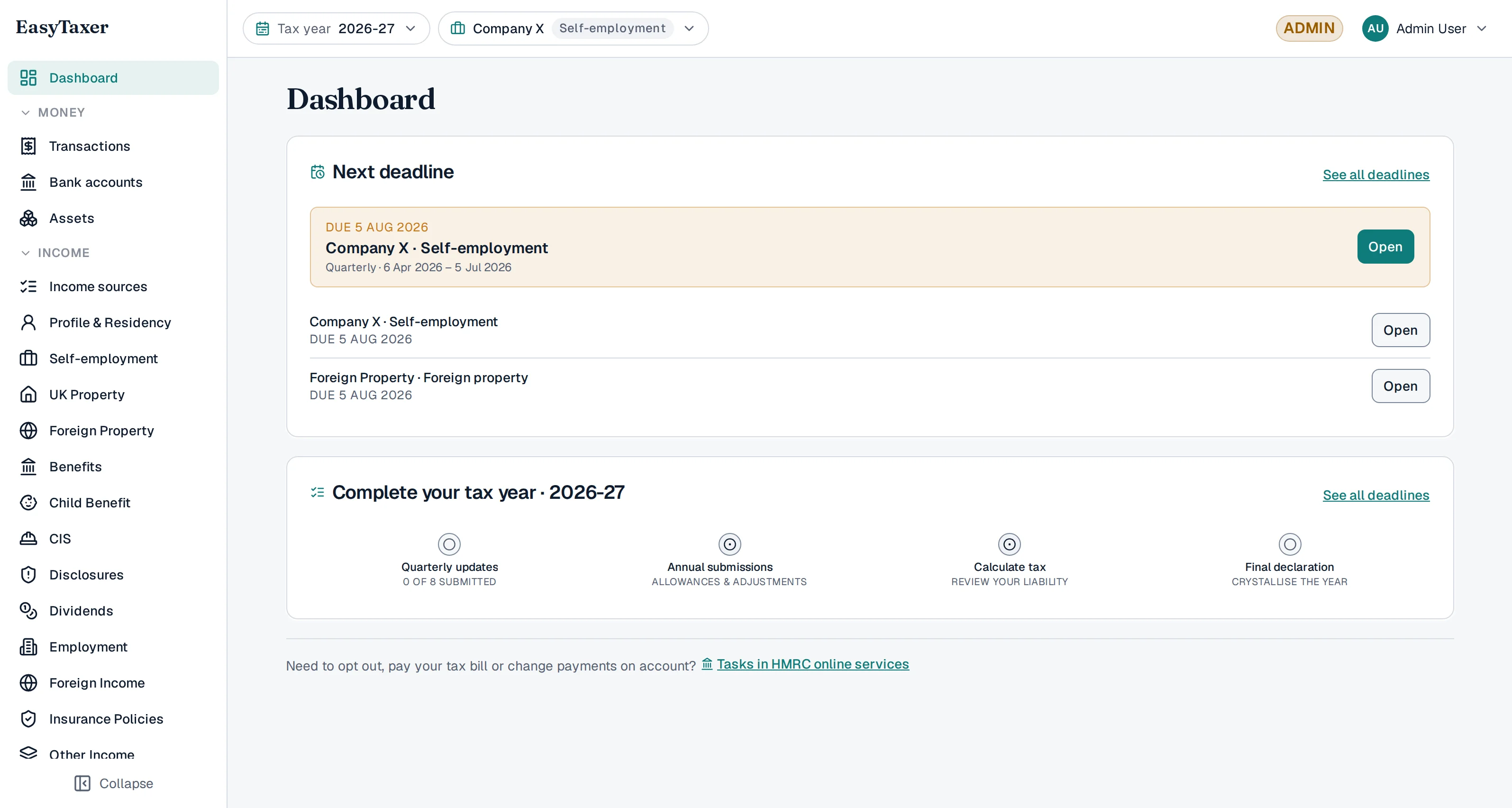
- The dashboard. A Next deadline panel highlights “Company X · Self-employment” — the quarterly update that falls due next, showing the period it covers, its deadline and an Open button; the other obligations that share that deadline — self-employment, foreign property and UK property — are listed under it. Below, a “Complete your tax year · 2026-27” strip shows quarterly updates (none submitted yet), annual submissions, calculate tax and final declaration.
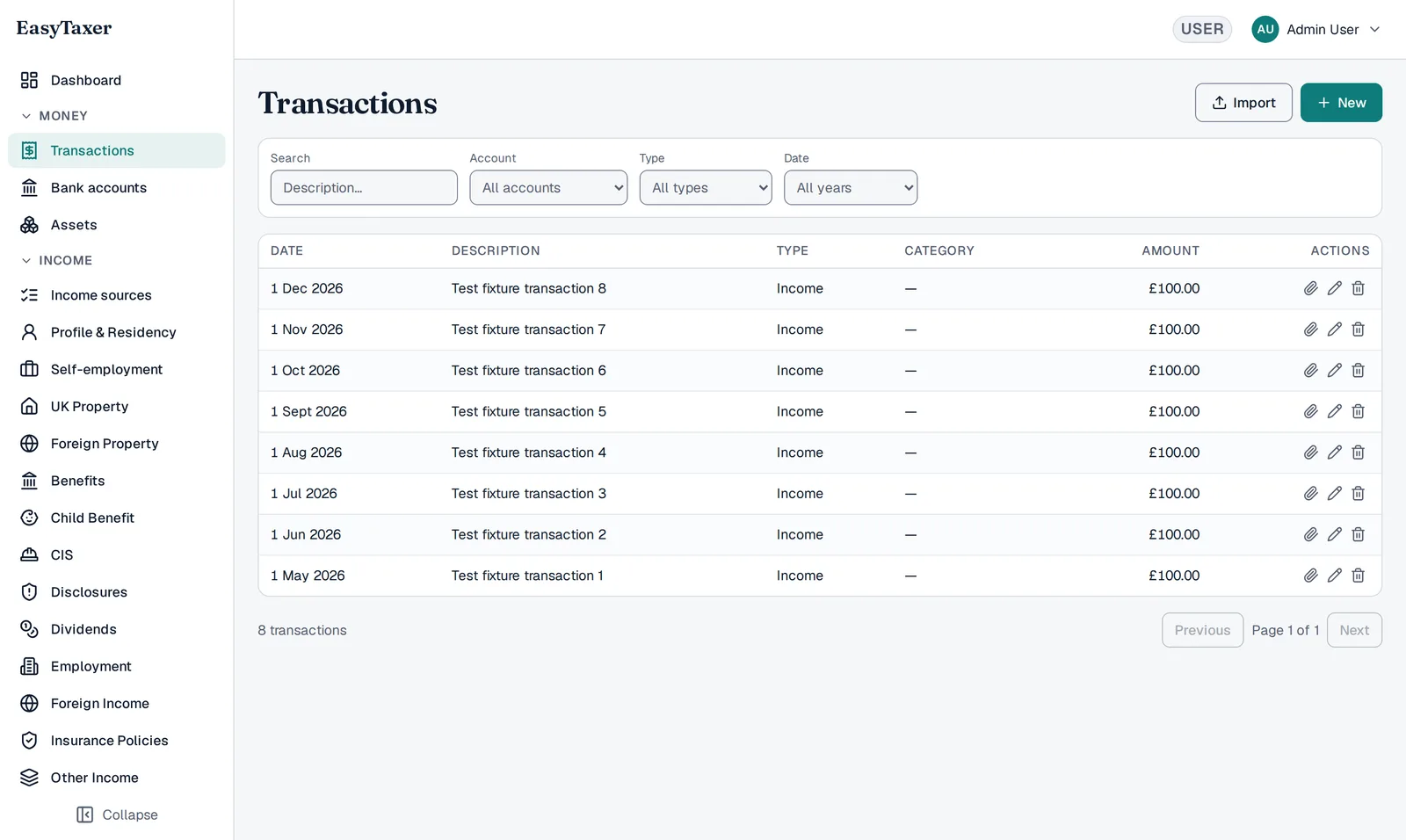
- Your transactions. The Transactions list, one row per transaction showing its date, description, type, category and amount, with filters for search, account, type and year, and Import and New buttons.
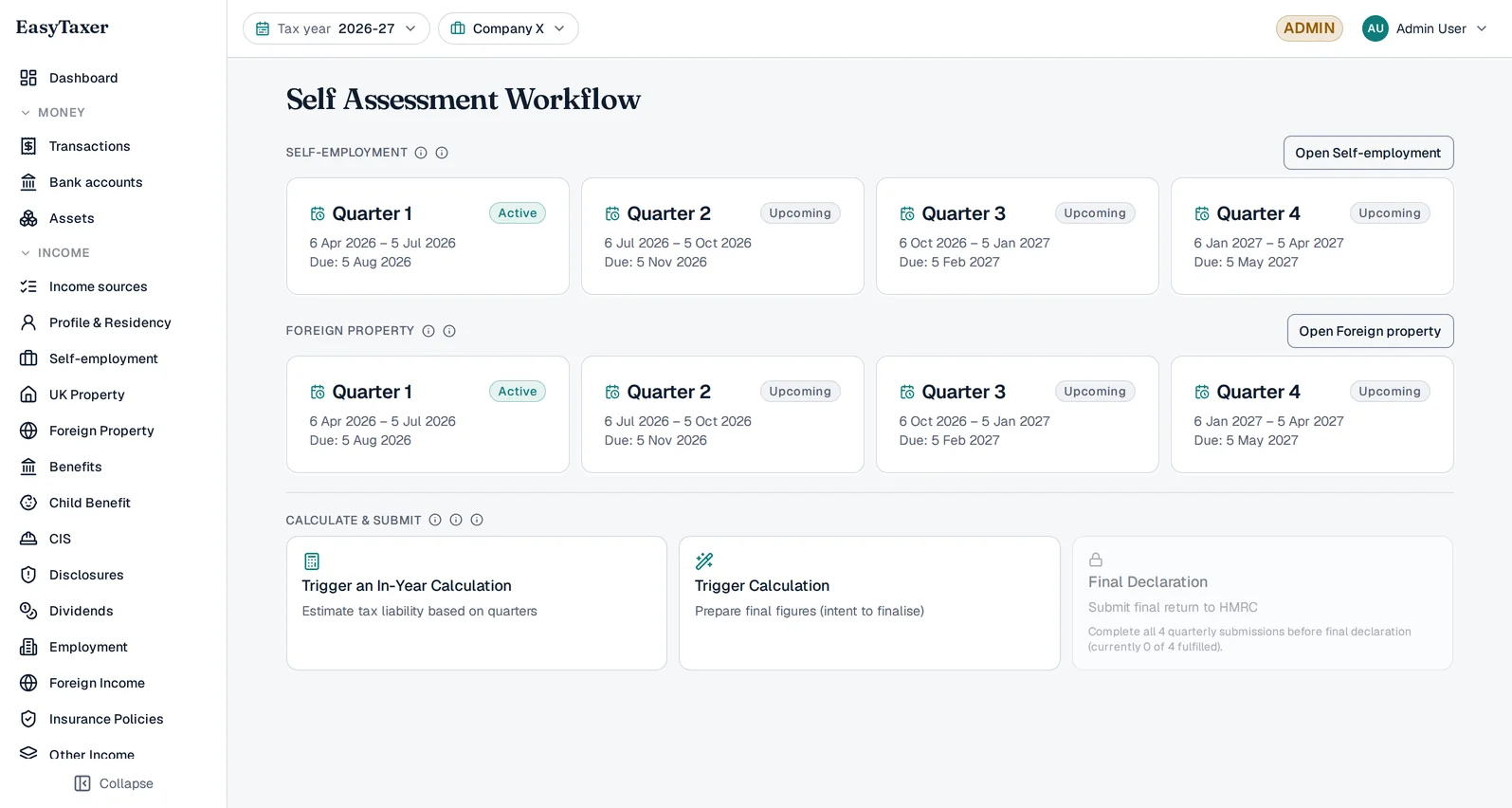
- The Self Assessment workflow. For each business — self-employment, UK property and foreign property — the four quarters with their periods and deadlines: Quarter 1 marked Late, Quarter 2 Active, and Quarters 3 and 4 Upcoming. Below them sit Trigger an In-Year Calculation, Trigger Calculation, and a Final Declaration tile greyed out until all four quarterly submissions have been made.
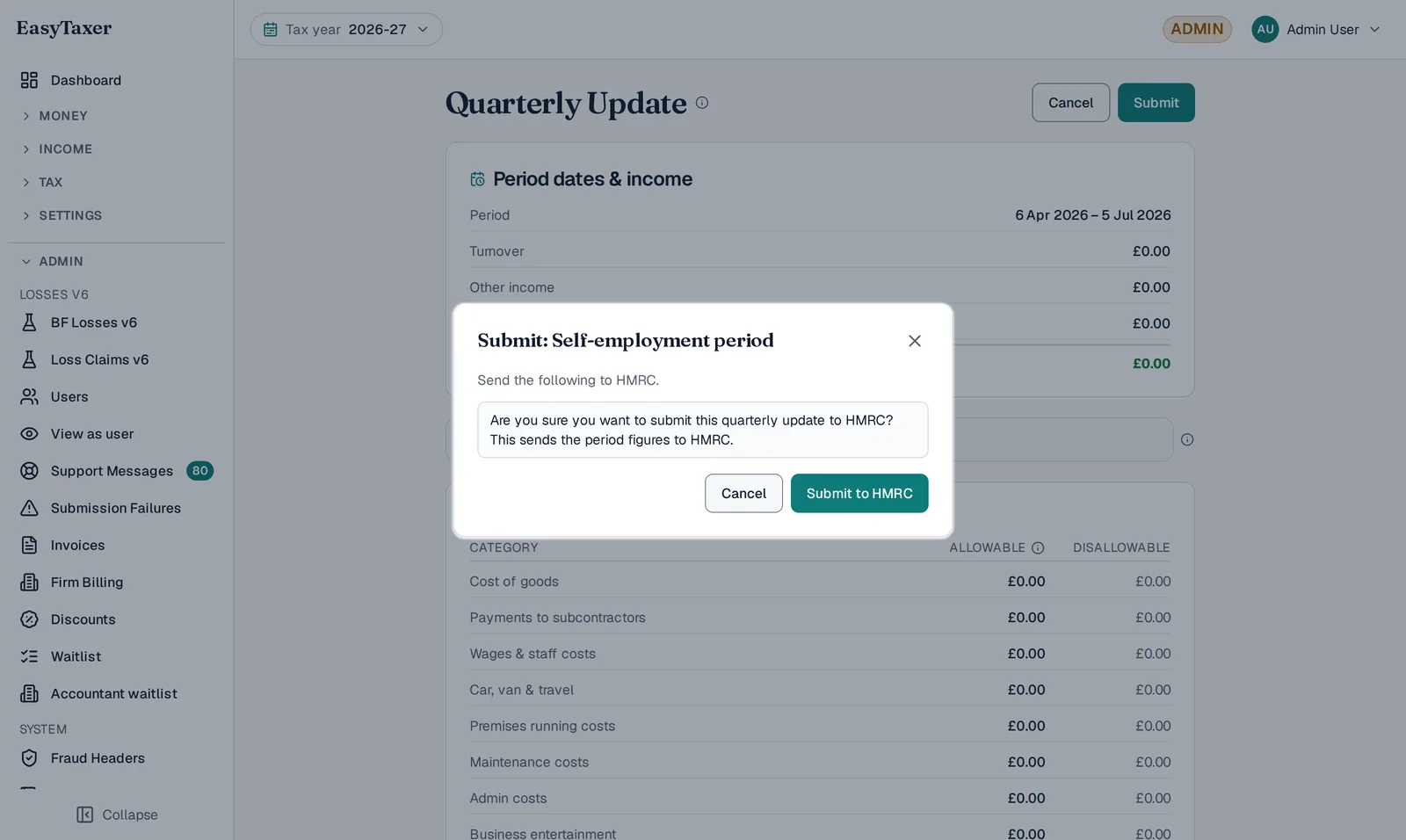
- Submitting the update. The Quarterly Update page, showing the period dates, income and the expense categories, with its confirmation dialog open over them: “Submit: Self-employment period — are you sure you want to submit this quarterly update to HMRC? This sends the period figures to HMRC.”, offering Cancel and Submit to HMRC. The recording ends here: it does not show the update being sent, or the confirmation that follows.
What is a quarterly update?
A quarterly update is a short digital summary of your business income and expenses, sent to HMRC after each three-month quarter ends. You send one for each of the four quarters in the tax year, and each one covers the tax year so far — from the start of the tax year to the end of that quarter, not just the latest three months. It's a running total, not your final figures — you'll confirm everything later in your final declaration.
Because EasyTaxer already holds your records, a quarterly update is mostly a case of checking the figures and pressing submit.
Video: A quarterly update is not a tax return: what Making Tax Digital actually asks you to send
Text version of this video
-
The short answer
A quarterly update is not a tax return. In HMRC's words, quarterly updates are summaries, not tax returns. Under Making Tax Digital for Income Tax, you send four of them during the year for each business, and then one tax return after the year ends.
-
What a quarterly update contains
A quarterly update is the totals of your self-employment and property income and expenses, for each category, worked out by your software from your digital records. HMRC doesn't receive individual records, like a receipt or an invoice. And you don't need to make any accounting or tax adjustments before you send one.
-
After you send an update, you can get an estimate of your tax bill, in your software or your HMRC online account.
-
What the tax return adds
The tax return comes after your final update. First, you make any adjustments, like claiming allowances, or removing expenses you can't claim. Then you make sure all your other income is included. HMRC adds some, like employment income and pensions. You add others, like savings interest and dividends. Then you check the tax calculation, and submit it through your software.
-
The deadline
The tax return is due by 31 January after the tax year ends, and so is any tax you owe. For the 2026 to 2027 tax year, that's 31 January 2028.
-
EasyTaxer is recognised by HMRC for Making Tax Digital for Income Tax. You'll find it at easytaxer.com.
When are they due?
With standard update periods, which follow the tax year (6 April – 5 April), each quarter has a deadline a little over a month after it ends. Each update covers the tax year so far, so the period it covers always starts on 6 April:
| Deadline | Quarter | Update covers |
|---|---|---|
| 7 August | Q1 | 6 Apr – 5 Jul |
| 7 November | Q2 | 6 Apr – 5 Oct |
| 7 February | Q3 | 6 Apr – 5 Jan |
| 7 May | Q4 | 6 Apr – 5 Apr |
In the words of GOV.UK's Send quarterly updates guidance, each time you send a quarterly update “it will cover from the start of the tax year to the end of the update period, not just the previous three months. This means you can correct your records without having to resend previous updates.”
If you use calendar update periods instead (1 April – 31 March, each period ending on the last day of a month), your updates cover 1 April – 30 June, 1 April – 30 September, 1 April – 31 December and 1 April – 31 March. The deadlines are the same.
EasyTaxer shows your next deadline on your dashboard, so you never have to memorise these.
Submitting your update, step by step
Check what's due
Open your dashboard. EasyTaxer lists the obligations it has fetched from HMRC and highlights the quarterly update that's due, with its deadline.
Make sure your records are complete
Enter or import any income and expenses for the quarter that aren't already recorded. The more up to date your records, the more accurate your update — and your real-time tax estimate.
Review the figures
EasyTaxer totals your income and expenses for the period and shows you exactly what it will send to HMRC. Have a quick look to make sure it matches your expectations.
Submit to HMRC
Confirm and submit. EasyTaxer sends your update directly to HMRC through its secure API and shows you a confirmation. Your dashboard then updates to show the obligation as met — and the next deadline.
A few tips
- Keep records as you go — it makes each quarterly update almost effortless.
- Quarterly figures are estimates; you can correct anything later in your final declaration.
- If you have more than one business or property, you'll submit an update for each.
Common questions
What if I made a mistake?
Quarterly updates are cumulative, so a later update can correct an earlier figure, and your final declaration confirms the true totals. EasyTaxer makes amendments straightforward.
Do I pay tax with each update?
No. Quarterly updates are for reporting only. Your tax is calculated and due based on your year-end final declaration.
What happens at the end of the year?
After the tax year ends you confirm your final figures and submit your final declaration, which replaces the old Self Assessment return.
Ready to stay on top of every quarter?
EasyTaxer tracks your deadlines and walks you through each submission.
Get started